Getting Started
Install Jetic, initialize a project, and scan your Express source in under a minute.
This guide gets you from zero to a populated behavioral model. Nothing here needs an AI provider key.
Prerequisites
- Node.js
>= 20 - A backend project (Express + TypeScript gets automatic scanning; other stacks are supported via manual modeling)
1. Install the CLI
npm install -g jetic-cliSee Installation for npx, building from source, and the package-vs-binary distinction.
2. Initialize and scan
From your backend project root:
# Scaffold the .jetic/ workspace
jetic init

# Statically scan Express/TypeScript routes into .jetic/model.json
jetic scan
jetic init creates the .jetic/ directory and an empty model. jetic scan reads your tsconfig.json, discovers routes, nested router prefixes, path parameters, middleware names, and source locations, then writes them to .jetic/model.json.
What the scanner does not do
The scan is fully static. It discovers routes and middleware — it does not infer request/response schemas or business constraints. Add those manually in Studio or through the MCP tools.
3. Choose your interface
Launch the local web IDE to explore the model, run simulations, and inspect traces:
jetic devThis serves Jetic Studio at http://localhost:8787 (override with jetic dev --port 9000). See Jetic Studio.
You can also stay entirely in the terminal:
jetic inspect
jetic inspect endpoint GET /api/orders/:id
The 4-phase lifecycle
Jetic follows a strict order. Skipping or reordering phases is what produces stale or incomplete models.
2. Scan & model
jetic scanFor Express + TypeScript this is a keyless static AST scan. For any other stack, model each endpoint by hand or via MCP (jetic_add_endpoint).
3. Verify
Run jetic_verify_model (via MCP) until every endpoint has a description, at least one tag, and described parameters and responses.
4. Simulate
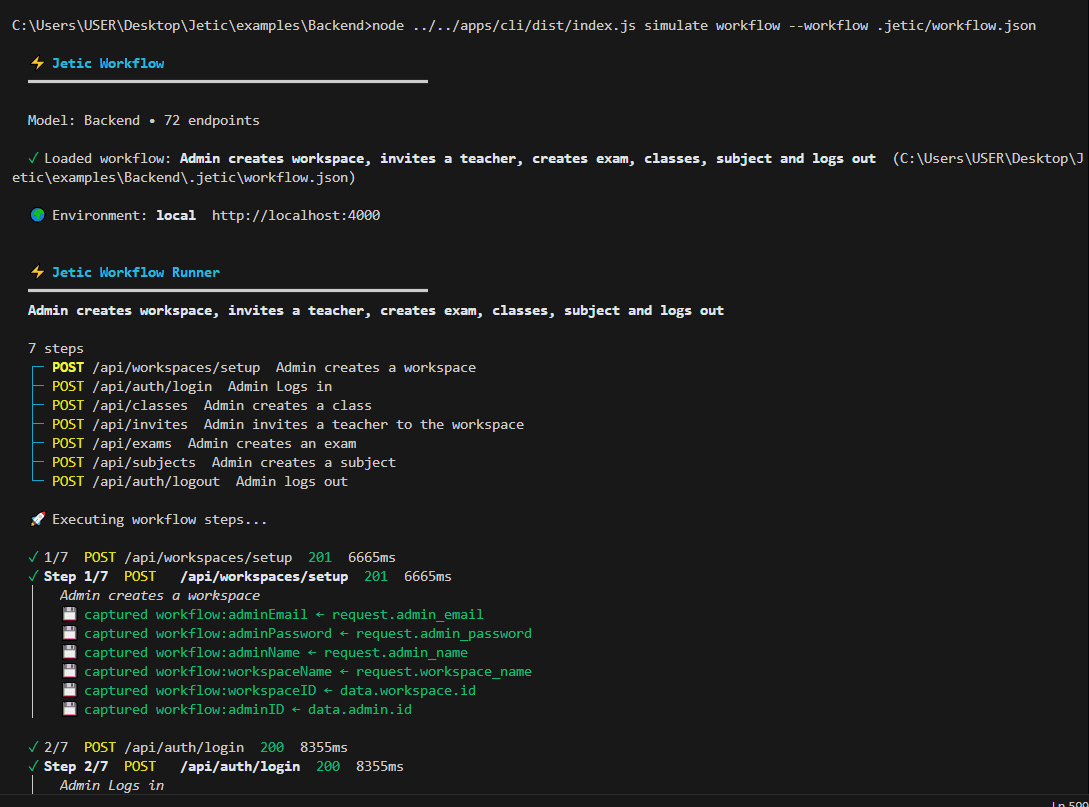
jetic simulate workflow --workflow .jetic/workflows/user-onboarding.jsonExecute a stateful journey against a live server. See Workflows.
Quickstart with the bundled example
The repository ships an Express fixture you can drive end to end:
cd examples/express-shop

jetic init        # Scaffold .jetic/
jetic scan        # Build .jetic/model.json
jetic inspect     # Print discovered model metrics
jetic dev         # Open Jetic Studio